> For the complete documentation index, see [llms.txt](https://docs.astroid.cc/llms.txt). Markdown versions of documentation pages are available by appending `.md` to page URLs; this page is available as [Markdown](https://docs.astroid.cc/get-started/deleting-your-endpoint.md).
# Deleting your endpoint
You want to delete your endpoint (bridge)? Thats sad to hear :( Do you want to give us some feedback why? -> Join our [Support Servers](/useful/support-server-list.md)
## Option 1: via the Discord bot
You can delete your endpoint via a simple command.
`/delete`
After succesful deletion you should receive a message like this:
## Option 2: via an API request
You can use our API sending a simple `DELETE`-Request.\
For sending a request like this you could use a program like Postman (, no account needed) or any other program you prefer.\
*(Note: I am using Postman in the example screenshots.)*
cURL snippet
```shell
curl --location --request DELETE 'https://astroid.cc/delete/YOUR-DISCORD-SERVER-ID?token=YOUR-TOKEN'
```
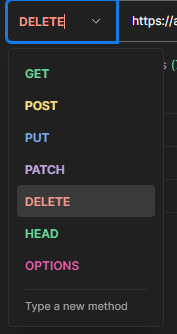
### Step 1: Set the request to `DELETE`
### Step 2: Enter the API URL
Enter the following API URL and
* replace `YOUR-DISCORD-SERVER-ID` with your discord server id and
* replace `YOUR-TOKEN` with the token you got in the registering process\
(Alternatively you can run the `/generate-token` command on discord to get a new one)
```
https://api.astroid.cc/delete/YOUR-DISCORD-SERVER-ID?token=YOUR-TOKEN
```
### Step 3: Press Send
If you replaced and set everything correctly send the request. The API should respond instantly with a succesful response. E.g.:
```json
{
"message": "Deleted."
}
```
## Option 3: Send us an E-Mail
You can also just write us an E-Mail and we do all the work for you!
### Email: [info@astroid.cc](#email-info-astroid.cc)
E-Mail template
Dear Astroid team,
i would like to delete my endpoint with the id `ENDPOINT-ID`. The token is `TOKEN`.
Best regards!
If you send us an E-Mail, please make sure the following information is contained:
* Stating that you would like to delete your endpoint
* Endpoint ID (usually the Discord Server ID)
* Astroid Token (You got this in the registering process or generate a new via the following discord bot command: `/generate-token`)
* ***Optional**: Reason for deleting your endpoint. (We'd just like to know why, no necessity though ;) )*
## Done!
All your data is now deleted.